





You can have great ads and serious budgets on Meta and still struggle with acquisition. The missing layer is usually data.
Meta Pixel and Conversions API are what supply that data. Without them, Meta doesn’t see what happens after the click, so the algorithm is forced to optimize on weak signals instead of conversions. The result is predictable: inefficient learning, unstable scaling, and acquisition costs rising faster than revenue.
This guide explains what Meta Pixel does, how it works in funnels, how it connects to Conversions API, and how to use both to grow revenue, not just traffic.
What is Meta Pixel?
Meta Pixel is a JavaScript tracking code added to a website or web funnel to capture user actions after a click on a Facebook or Instagram ad, such as page views, sign-ups, onboarding completion, trial starts, and purchases. These events are sent to the Meta Events Manager and used for attribution, conversion tracking, campaign optimization, retargeting, and audience building.
In simple terms, Meta Pixel connects ad clicks to user behavior and revenue. If there is a browser between your ad and the app store, Meta Pixel is a must.
Here’s how Meta Pixel works
- A user clicks on a Facebook or Instagram ad.
- The user lands on your page.
- A Meta Pixel event fires in the browser (for example, a page view, onboarding start, or purchase).
- The event is sent to the Meta Events Manager.
- Meta matches the event to the ad and uses it to optimize delivery.
At a technical level, Meta Pixel operates entirely on the browser side. It creates a browser-based user identity and links on-site actions to specific ad impressions and clicks. This direct matching is what enables Meta’s algorithm to optimize campaigns toward real conversion events instead of surface-level engagement.
What Meta Pixel gives you beyond basic tracking
Meta Pixel is not just a counter of page views. When configured correctly, it becomes a performance signal that directly affects how Meta learns, optimizes, and allocates budget across your campaigns.
1. Optimization based on business events
With Meta Pixel, the algorithm learns not from clicks, but from revenue-driving actions such as purchases, registrations, or trial starts.
2. Full visibility into the web-stage funnel
Meta Pixel shows where users drop off, which steps they complete before payment, and which creative + landing + offer combinations convert.
3. Full-funnel retargeting
Meta Pixel lets you re-engage users who viewed pricing, abandoned checkout, started onboarding but didn’t complete it, or launched a trial without converting to paid. Instead of retargeting broad audiences, you work with high-intent segments tied to specific funnel actions.
4. Audience building and scaling
Meta Pixel lets you build Custom Audiences from any web event and create Lookalike audiences based on conversions. This allows Meta to expand delivery to users who statistically behave like your paying customers.
5. Linking web data to app revenue
When combined with an app SDK or server-side events, Meta Pixel connects what happens on the web with what happens inside the app, so UA optimization is driven by subscription performance.
These server-side events are transmitted through Conversions API, Meta’s server-side channel for receiving conversion data. That’s where the second half of Meta’s tracking system begins.
Meta Pixel and Conversions API: What’s the difference, and why you need both
Meta uses two channels to receive conversion data: the browser (Meta Pixel) and the server (Conversions API). Both serve the same purpose — sending events for ad optimization — but operate at different levels and cover different types of data loss.
Meta Pixel provides the primary stream of optimization signals by capturing what users do in the browser after the click. As a browser-based tool, it remains exposed to blocking, in-app browser limitations, and privacy restrictions.
Conversions API closes these gaps by sending the same key events directly from the server. Server-side tracking allows Meta to:
- retain conversion data when payments happen on offsite checkout pages,
- transmit purchases reliably from in-app browsers,
- operate under cookie and ITP restrictions,
- preserve attribution when front-end tracking fails.
| Feature | Meta Pixel | Conversions API |
|---|---|---|
| Source | Browser | Server |
| Can be blocked | Yes | No |
| Mobile in-app browsers | Often broken | Stable |
| Deduplication | Needs setup | Server-level |
| 3rd-party checkout | Often lost | Fully tracked |
Pixel and CAPI are not interchangeable and are typically used together.
How Pixel and CAPI work together in web2app funnels
In web2app funnels, Meta Pixel and Conversions API operate as a single tracking system.
- Meta Pixel captures the entire pre-install journey in the browser: page views, onboarding completion, checkout views, and other behavioral signals leading up to the payment.
- Conversions API confirms payments and subscription renewals on the server side.
As a result, Meta receives a continuous stream of signals from the first click to the initial purchase and subsequent renewals. This enables:
- optimization based on revenue,
- stable algorithm learning,
- precise retargeting,
- consistent UA without data blind spots.
In FunnelFox, Meta Pixel and Conversions API are used to track all key user actions across web2app funnels, from screen views and onboarding completion to checkout, payments, and subscription renewals.
Meta Pixel setup: Creation, installation, and event configuration
Now that we’ve covered what Meta Pixel does and why it matters, it’s time to walk through the actual setup, from creating your Pixel to sending the right events into Meta for optimization.
How to create a Meta Pixel
- Go to Meta Events Manager.
- Click Connect data and select Web.
- Click Connect.
- Enter a name for your pixel.
- Click Create pixel — a new Pixel ID (Dataset ID) will be generated.
- Save the Pixel ID, you will need it for installation.
Meta will then offer several setup options: partner integration, Conversions API Gateway, or manual installation. The right choice depends on your platform and technical setup.
If you use FunnelFox, manual code installation is not required. You only need to provide your Pixel ID, and it will be automatically injected into all published funnels.
Where to add Meta Pixel code (if you’re setting up Pixel manually)
The Meta Pixel base code must be added to the <head> section of every page. Place it as high in the code as possible so it loads early, and make sure it appears before other scripts that might block execution.
How to set up Meta Pixel events
Meta offers two ways to configure events: using the Event Setup Tool (point-and-click in the interface), or through manual code installation.
During setup, you:
- select an existing Pixel,
- define which on-page actions should be tracked,
- map them to Meta’s standard events (such as Purchase, InitiateCheckout, etc.),
- verify that events are received in Events Manager.
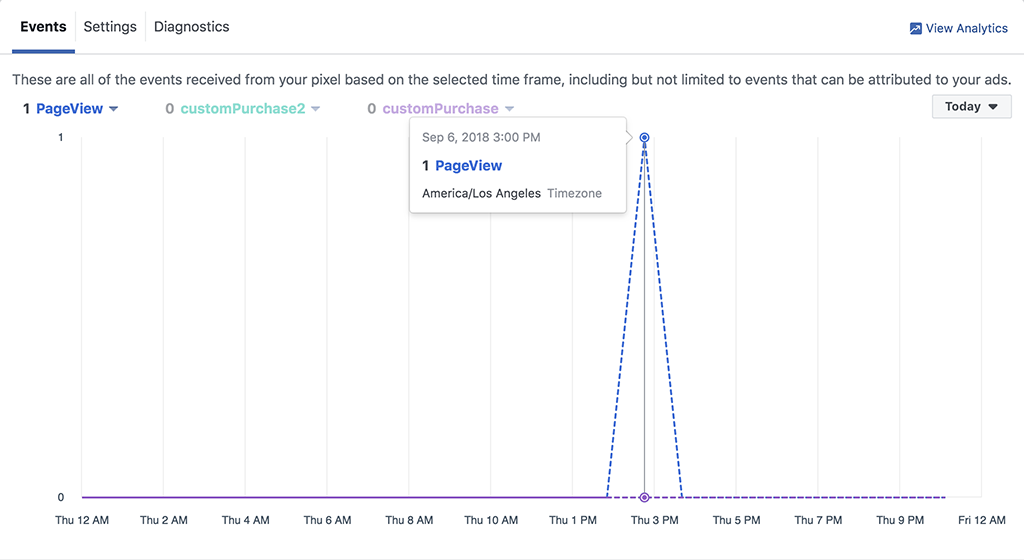
This is how a fired event will look in the Events Manager:
Standard events
For user acquisition in subscription-based apps, the following standard events are recommended: ViewContent, InitiateCheckout, CompleteRegistration, StartTrial, and Purchase.
These events are used by Meta for campaign optimization and audience building.
Custom events
Custom events can be used for internal analytics, but Meta applies important limitations to them:
- campaigns cannot be optimized on custom events with the same efficiency as on standard events,
- custom events are not used for algorithm training in performance campaigns,
- some parameters may be ignored by the system.
For UA campaigns, always prioritize standard events.
Conversions API setup for server-side tracking
Conversions API is configured separately from the browser-based Pixel and requires generating a secure server access token in Meta. This is the layer that ensures critical financial events are delivered to Meta even when browser tracking fails.
- In Meta Events Manager, enable Conversions API for the selected Pixel.
- Generate a CAPI Access Token.
- Use this token to authorize server-to-server event delivery.
- Once activated, events will start appearing in Events Manager as server-side.
This setup allows Meta to receive payment and renewal events (Purchase and Renewal) directly from the server, even when browser-based events are blocked or lost.
In FunnelFox, manual server-side integration is not required. You only need to provide your Pixel ID and CAPI Access Token and republish your funnels. FunnelFox automatically sends server-side events and handles deduplication using event_id and external_id.
How to verify Meta Pixel & CAPI setup
After setting up both Meta Pixel and Conversions API, it’s critical to verify that events are actually reaching Meta and are being processed correctly.
1. Test Events
In Events Manager → Test Events, open your funnel in test mode and perform key actions. Make sure events such as ViewContent, InitiateCheckout, and Purchase appear in real time.
2. Events Manager overview
In the Overview tab, check whether events have been received in the last 24 hours and whether they are labeled as Browser, Server, or Browser + Server. This view quickly shows if server-side tracking is working alongside Pixel.
3. Diagnostics
In the Diagnostics tab, Meta highlights missing or dropped events, deduplication errors, and parameter mismatches. Any critical warnings here directly affect optimization and attribution quality.
4. Integration status (CAPI)
For Conversions API, verify that the server-side data source is active, event_id is being passed, and no token authorization errors are reported. If server-side events do not appear, Meta is currently receiving data only from the browser layer.
Common Meta Pixel & CAPI problems and how to fix them
1. Events missing
The most common reason events fail to reach Meta is incorrect Pixel installation: the base code is missing on some pages, loads too late, or events are configured with errors. In this state, Meta does not receive InitiateCheckout, Purchase, or Registration signals and cannot learn properly.
Fix: Place the base code in the <head> of all pages, ensure early loading, and validate every key event through Test Events in Events Manager.
2. Domain blocked or not verified
If the domain is not verified in Business Manager or not linked to the Pixel, Meta may partially or fully ignore incoming events. This directly breaks optimization and attribution.
Fix: Complete domain verification and assign the verified domain to your Pixel.
3. Duplicate events
Duplicates occur when the same event is sent from both the browser and the server without proper deduplication. This appears as duplicated Purchase or Trial events and distorts reporting.
Fix: Use the same event_id for Pixel and CAPI and monitor deduplication status in the Diagnostics tab.
4. Offsite checkout not tracked
When payment happens on a third-party domain (PayPal, Stripe Hosted Checkout, etc.), the browser context is often lost, and Pixel may fail to register the purchase. In this scenario, the only reliable solution is Conversions API with server-side events.
Fix: Whenever possible, use an embedded checkout so the user remains on your funnel domain.
5. iOS & in-app browsers
Facebook and Instagram in-app browsers execute JavaScript inconsistently and severely restrict cookies. Even with a correct Pixel setup, part of the signal can be lost. The only stable measurement layer in these environments is server-side tracking through Conversions API.
Troubleshooting common problems
| Issue | Cause | Solution |
| Events not appearing | Invalid Access Token | Regenerate token in Events Manager > Settings |
| Duplicate events | Missing event_id for deduplication | Add unique event_id to both Pixel and CAPI events |
| Low EMQ score (<6.0) | Insufficient user parameters | Add email, phone, fbp, fbc parameters |
| Events Manager empty | Pixel not connected to dataset | Verify Pixel ID matches in Events Manager |
| Conversion count mismatch | Deduplication not working | Ensure event_id and external_id match between sources |
| Server timeout errors | Network latency or overload | Set timeout to 1500ms, implement retry logic |
| 4xx HTTP errors | Malformed payload | Check JSON structure, required fields, hash formats |
| Events delayed | Batch processing too slow | Send events in real-time or within 1 hour max |
Wrap-up
Meta Pixel and Conversions API are far less rewarding than most sides of UA. Yet this is the layer that determines whether your campaigns are optimized for business outcomes or for empty clicks.
They define what Meta learns from your traffic. Without them, optimization is based on incomplete or indirect signals. With them, it’s tied to payments, renewals, and revenue across your funnels.
Creatives matter, and budgets do too. Reliable data is what helps both deliver what you expect from them.