



Lifecycle email marketing is a strategy where emails are triggered by user behavior and timed to match where someone is in their relationship with your product.
For subscription apps, this matters because every stage of the subscription has a direct revenue consequence. A user who doesn’t activate in the first two weeks rarely renews. A churned user who receives no win-back email is revenue that doesn’t return. Lifecycle email is the system that connects each of those stages—and closes the gaps.
Here’s how to build it properly, with a specific lens on web2app funnels where lifecycle email has an unusually high leverage point.
Why lifecycle email marketing matters for subscription apps
What is customer lifecycle marketing?
Customer lifecycle marketing means engaging users differently depending on where they are in their relationship with your product—first visit, new subscriber, active user, at-risk of churning, already gone. Each stage has one job: move the user to the next step. Lifecycle email is the channel that makes that happen at scale.
Every stage of the subscription lifecycle has a direct revenue consequence
The stakes are higher than they look:
- A user who signs up but never reaches the paywall is a lost conversion—and a warm lead you already paid to acquire
- A subscriber who doesn’t activate in the first two weeks is unlikely to renew when the first billing cycle comes
- A churned user who receives no win-back email is revenue that quietly disappears
- Lifecycle email is the mechanism that connects each of these stages—and plugs the leaks
Every drop-off point in your funnel is addressable. Lifecycle email is how you address them systematically.
What lifecycle email does that other channels can’t
Paid media brings users in. In-app messaging reaches users already in the app. Lifecycle email does something neither can: it reaches users exactly when they’re not in your product, triggered by what they’ve actually done—or stopped doing.
The advantages are concrete. Lifecycle emails are triggered by behavior, not a calendar, so they land at the most relevant moment. They’re personalizable from day one using whatever data you captured during onboarding. They work across the full funnel—acquisition, activation, retention, reactivation. And unlike paid channels, email is owned: no algorithm changes, no rising CPMs, no distribution costs per send.
Lifecycle email marketing for web2app funnels
Web2app funnels create a set of conditions that make lifecycle email particularly powerful—and particularly effective when done right.
You collect emails before the paywall—including from users who didn’t convert
In a web2app funnel, email is captured mid-session, before the user ever reaches the paywall. That single structural fact changes the economics of the entire channel. You have a contact for everyone who completed the quiz—including the 60–80% who didn’t purchase. These non-converters aren’t cold leads. They showed enough interest to complete a detailed onboarding quiz; they just didn’t buy on that session.
Lifecycle email is the primary tool for converting them after the session ends.
The quiz gives you more data to personalize with from day one
A web2app onboarding quiz is more detailed than a typical in-app onboarding flow. By the time you have the user’s email address, you already know their goal, their pain point, their context, and their desired timeline. That data is attached to the email contact at the moment of capture, ready to use at every lifecycle stage.
The more detailed the quiz, the more segmentation dimensions you have to work with—and the more relevant every downstream email can be.
Zero-party data is the term for this. It refers to information a person intentionally shares with a brand—quiz answers, stated goals, preferences. It doesn’t need to be inferred or tracked from behavior. It’s the most accurate and privacy-safe type of user data available, and an onboarding quiz is one of the most efficient ways to collect it at scale. Zero-party data examples include the exact quiz answers your users submit: their health goals, fitness level, time available, prior experience, and so on.
Here’s an example of how Fabulous, a habit and routine app, puts this data to work. After a user completes their quiz and provides their email, the app sends a personalized lifecycle email that ties directly to the routines they said they wanted to build:
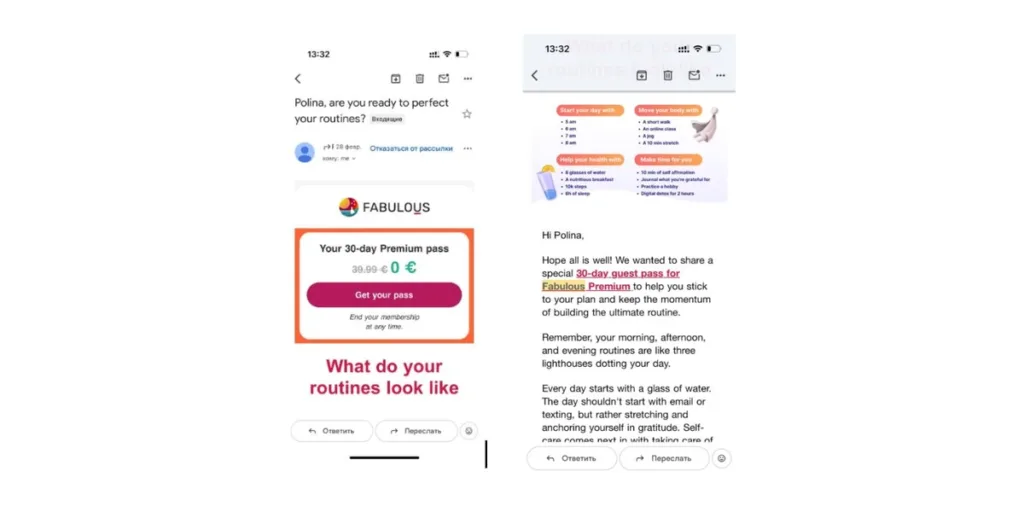
Fabulous app, example of a personalized email
The subject line uses the user’s first name. The offer matches the goal they stated. The email body visualizes the exact routines they said they wanted to create. This is zero-party data in action—everything came directly from the quiz..
| 💡 FunnelFox is built for subscription apps that run web2app funnels. It lets you build quiz onboarding, paywalls, and checkouts—and connects your funnel data directly to your email platform as contact properties, so every lifecycle email can reference what the user told you in the quiz. Book a demo → |
The five lifecycle email stages every subscription app needs
Most apps have one or two of these. The best apps have all five, triggered precisely and personalized from quiz data. Here’s the full picture at a glance:
| Lifecycle stage | Where the user is | What the email should do |
|---|---|---|
| Welcome | Signed up, hasn’t bought yet | Remind them why they came, push them to the paywall |
| Abandoned checkout | Finished the quiz, didn’t buy | Win back the drop-off |
| Onboarding | Bought, hasn’t formed a habit yet | Get them to their first result |
| Trial nudge | Inside a free trial | Convert before it ends |
| Win-back | Cancelled or gone quiet | Bring them back on their own terms |
Now let’s go deeper on each one.
What is a welcome email and what should it say?
The welcome email fires immediately when the user submits their email—before the paywall. It’s the highest open-rate email in any sequence because the user just interacted with your brand seconds ago. That attention is fragile. This is not the moment for generic.
The welcome email must reference quiz answers. Not “Welcome to [App]!”—that wastes the moment. Instead: “You said you want to lose 8kg in 12 weeks. Here’s how [App] gets you there.” The goal the user stated is the hook. Everything else in the email exists to walk them back to the paywall.
One rule: single CTA only. Return to paywall, start your plan. Nothing else.
Example subject line: “Your personalized plan is ready, [first name]”
What is an abandoned checkout email?
An abandoned checkout email goes to a user who completed the onboarding quiz but didn’t convert at the paywall. It’s triggered by the gap between email capture and purchase confirmation. In web2app funnels, this is the highest-volume drop-off point—and the most recoverable with email.
A three-email sequence typically looks like this: a reminder at 1 hour, social proof at 24 hours, a soft offer at 72 hours. Every email in the sequence references the user’s quiz result—the goal they stated is the hook, not a discount.
Email follow-ups can recover 5–10% of revenue. For market leaders, even more—up to 20% (Kirill Makarov, Founder of WebFunnels Club, based on his analysis of 311 web funnels). That’s revenue you’ve already paid to acquire, coming back.
What should an onboarding email sequence include?
An onboarding email sequence for a subscription app should include 5–7 emails delivered over 14 days. The structure follows a clear arc:
- Email 1 drives immediate activation—gets the user to their first meaningful action in the app
- Emails 2–4 build habit and demonstrate value through the user’s specific goal
- Emails 5–7 address the most common reasons users disengage before the first renewal
Segment by quiz persona from email 1. A user who said they want to improve sleep needs a different onboarding email than a user who said they want to lose weight—even if both are using the same app. Different goal, different sequence from the start. Generic onboarding emails are a missed opportunity when you already have the data to do better.
What emails convert free trial users to paid subscribers?
Three emails. Day 5 is about progress, not selling: “You’ve completed 3 sessions. Here’s what that means for your goal.” Show what they’ve accomplished. Reinforce the value.
Days 12 and 13 shift to loss framing—what the user loses access to when the trial ends, not what they gain by subscribing. This is a critical distinction. People are more motivated by loss than gain, especially for something they’ve already experienced. Make the cost of not subscribing feel concrete.
Subject lines for all three should be written as actual subject lines, not descriptions of what they should say. “Your trial ends in 48 hours” beats “Final trial reminder.”
When should you send a win-back email?
Send the first win-back email 30 days after churn. If no response, send a second at 60 days—this is the right moment to include a discount or reactivation incentive. A third at 90 days is the final attempt. After 90 days, suppress the contact to protect deliverability.
But the timing is only half the equation. Voluntary churn and involuntary churn need different copy:
- Voluntary churners cancelled because the product didn’t deliver on its promise. Lead with their original goal, not a discount. “You said you wanted to [goal]. You were [X] away.” Remind them what they came for.
- Involuntary churners may not even know they’ve lost access. Their payment failed—that’s a technical problem, not a product one. Simple framing, one-click fix. No emotional appeals.
Sending the same win-back email to both groups is one of the most common—and most fixable—revenue leaks in subscription businesses.
How to segment your email list using quiz answers
The web2app quiz collects more structured intent data than most onboarding flows. Segment across three dimensions: what the user wants to achieve (goal), who they are (demographics), and how fast they want results (urgency). Build 3–6 email tracks from the most meaningful combinations and trigger the appropriate track at signup. Update segments dynamically as behavioral data accumulates.
Goal-based segmentation
One email track per primary goal stated in the quiz. Every track opens differently and references that goal throughout the entire sequence. To feel the difference, compare two subject lines for the same email:
- Generic: “Start your journey today”
- Goal-personalized: “You said you want to sleep 8 hours—here’s day one”
The gap isn’t just cosmetic. Goal-personalized emails outperform generic ones consistently across open rate, click rate, and conversion. This is the baseline level of segmentation—not advanced personalization. It’s table stakes for any app running a quiz funnel.
Behavioral and quiz data combined
The real leverage comes when you layer post-signup behavior on top of quiz answers. Features used, onboarding progress, last app open—these create triggers that go beyond time-based sequences. “Stated goal is X + used feature Y + inactive 3 days” becomes a specific reactivation email, not a generic nudge.
This is where personalization becomes hard to ignore. It combines what the user told you they wanted with what they’ve actually done in the product. Practically, this means passing quiz answers to your email service provider (ESP) as contact properties via API or webhook. Tools like Klaviyo, Customer.io, Braze, Pushwoosh all support this—the quiz data becomes filterable dimensions you can use to build segments, trigger flows and personalize your messaging.
| 💡 FunnelFox syncs contact data and quiz responses to your ESP—so you can segment and personalize from day one, without waiting on engineering. Native Mailchimp integration is available out of the box; other ESPs connect via webhooks. Book a demo → |
Three things subscription apps get wrong with lifecycle email
Sending personalization-blind welcome emails
This is the most common mistake—and the cheapest to fix. Apps that run a web2app quiz already have the data. They just don’t use it in the first email. A welcome email that doesn’t reference what the user told you in the quiz wastes the highest-intent moment in the entire sequence. The fix is immediate: pull the goal field from the quiz into the subject line and the first paragraph. That’s it.
Treating voluntary and involuntary churn the same
Voluntary churners cancelled because the product didn’t deliver. Involuntary churners may not even know they’ve lost access—their payment failed quietly. The same win-back email sent to both groups is at best irrelevant, at worst damaging. This is one of the most fixable revenue leaks in a subscription business, and almost no app addresses it.
Building onboarding and stopping there
Most apps build a welcome sequence and consider lifecycle email done. Almost none build a win-back sequence—which is the wrong priority. Reactivating a churned user who already paid once costs a fraction of acquiring a new subscriber. Typical CAC for a new subscriber runs $50–100+. A well-timed win-back email costs cents to send and can reactivate users who already know your product. The ROI on win-back is routinely 10x better than acquisition—yet it gets built last, if at all.
FAQ
Conclusion
Lifecycle email is not one campaign. It’s a system that covers every stage where a subscription can be won or lost—from the moment someone submits their email in your quiz to the 90-day win-back window after they’ve gone quiet.
For web2app apps, the quiz creates an unusually strong starting point: more data, earlier, attached to every contact in your list. The apps that use it across all five lifecycle stages—and keep improving each one—compound that advantage over time. The apps that don’t are leaving recoverable revenue at every stage of the funnel.
| Ready to connect your quiz data to your email sequences? FunnelFox passes everything—goals, answers, quiz persona—directly to your ESP as contact properties, so you can start personalizing lifecycle email from day one without custom engineering. Book a demo → |