






This batch of updates lands across payments, tracking, and personalization. Details on each below.
Sharpen your Google Ads attribution with GA4 email forwarding
When users submit their email in your funnel, FunnelFox now forwards it as hashed user data to GA4 and the GTM data layer. This unlocks Google Ads Enhanced Conversions — a matching mechanism that connects your funnel conversions back to specific ad interactions using the email hash.
Two places the email lands:
- GA4 as hashed user data (user_data.sha256_email_address)
- GTM data layer, so you can trigger downstream tags from it
What it means for you: better match rates in Google Ads Enhanced Conversions, more accurate attribution, and tighter campaign optimization — especially important after post-iOS 14 signal loss made traditional tracking less reliable.
Learn more about the Google Ads integration
Reduce checkout friction with wallet-first Apple Pay
Stripe Managed Payments in FunnelFox now supports wallet-first checkout. When enabled, Apple Pay appears as the primary one-click payment button at the top of the Checkout element. Other payment methods (cards, Google Pay, etc.) collapse under a “Pay another way” button, kept accessible but out of the primary flow.
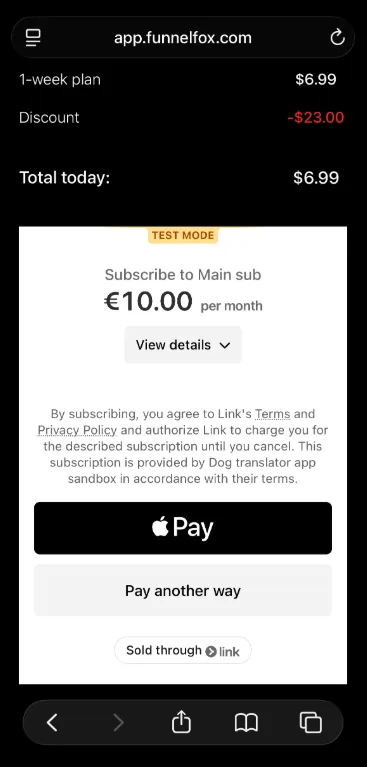
Enable it in the Checkout element after verifying your domain in Stripe.
What it means for you: faster checkouts for users with Apple Pay set up on their device. One-click purchases lift conversion, especially on mobile traffic.
Personalize the header on every funnel screen
The screen header title now accepts variables like {{name}} — so you can add personalization to the persistent header at the top of every funnel screen. Values come from user input or URL parameters, just like other variable fields in FunnelFox.
What it means for you: persistent personalization across the funnel. When users see their own name (or their answers, or their goal) in the header of every screen, the journey feels tailored rather than templated.
Learn more about screen header variables
Set your logo once, apply it across every screen
You can now upload a global logo in your funnel settings — it appears in the header of every screen automatically. Per-screen logos still override the global one when you want a specific screen to look different.
What it means for you: consistent branding at scale, without touching every screen individually. Especially useful when running multiple funnels or A/B tests where updating logos one screen at a time gets tedious fast.
Learn more about the global logo
Require an email address at Stripe checkout
The Checkout element now has an option to require an email field on the Stripe card form. Turn on Require email field (cards only) and a required email input appears above the card form. If the user already entered an email earlier in the funnel, the checkout email overrides it.
What it means for you: no missing emails at the moment of purchase. Every customer who completes checkout has an email on file, which matters for order confirmations, receipt delivery, downstream lifecycle campaigns, and customer support.
Learn more about the Checkout payment method
Reduce position bias in your quiz screens
The Options element now has a Randomize order toggle. When enabled, the order of options reshuffles every time the screen is displayed — so different visitors see the same choices in different sequences.
What it means for you: cleaner signal from your quiz and survey answers. Users tend to pick the first option they see (a common survey design bias), so randomization gives you a truer read on which choices resonate. Especially important when quiz answers drive downstream logic like paywall variants or personalization.
Learn more about configuring options
For the complete list of what’s shipped recently, check the FunnelFox release notes.