





You spend big to get users through the door, but most of your revenue still comes from that one initial subscription. Growing LTV feels slow, and revenue just isn’t climbing the way it should.
That’s where one-click upsells come in. Apps using in-funnel upsells see LTV jump by 20–30% — all because they catch users at the perfect moment with the right offer.
So, what are one-click upsells?
A one-click upsell is that extra offer you show users on top of their main purchase, usually right when they’re about to pay, or right after. These could be upgrades to longer-term subscription plans with a discount, exclusive content like guides or books, or even physical goods — anything you can imagine that would be relevant to your users.
You’ve got two main spots for upsells:
1. Right after checkout (post-purchase upsell)
The cleanest move: drop the upsell right after the user pays. They’ve already entered their card and made a purchase, so hitting them with a bundle, an upgrade, or a premium add-on right here can boost your average order value in seconds.
2. During onboarding
Some apps weave an upsell offer into the onboarding flow. It’s a great moment to ask users questions and learn about their goals, so you can recommend the most relevant upsell based on their answers right away, while the user is still immersed in the context. When an offer fits the user’s real needs, it feels personal (not pushy), and conversion goes way up.
Why do upsells work so well in web2app funnels?
The upsell screen is where web2app funnels really shine. You’re not stuck with App Store or Google Play rules. You control the user flow and the payment experience. Want to slip in a few upsell screens after checkout? Go for it. Want to experiment with different offers? It’s all yours.
But most importantly, by the moment your user sees an upsell, they’re already in the mindset to pay. Upsells work best when they’re built right into your funnel, not tacked on later: when you offer something extra during checkout or onboarding, you’re catching users at their most engaged. Their wallet is open, their attention is on you, and it’s easy to say yes.
The numbers don’t lie. In e-commerce (where mobile apps first borrowed the idea of one-click upsells), a well-timed funnel upsell converts at around 4% on average. For comparison, typical email campaigns barely crack 2% click-through, and push notifications lag even further behind.
What kind of offers work for one-click upsells?
Your one-click upsell offer will depend on your vertical and audience, but the classic options are:
- Subscription upgrades. Think monthly to annual. Offer a discount if they upgrade right now.
- VIP content or premium features. Unlock access to exclusive videos, practical guides, e-books, or advanced tools that aren’t available in the basic plan.
- Lifetime access. You can offer a “pay once, own it forever” deal. Great for users who hate recurring charges or want the ultimate bundle.
- Bundles. Package a few products or features together at a special price. For example, a fitness app might bundle a meal plan, a training program, and personal coach support.
- Physical products. If it fits your app, why not? Some education or wellness apps offer real-world books, branded gear, or even supplement kits.
💡 The higher the subscription price, the higher the upsell conversion.
People who pay more are often willing to spend more, so don’t be afraid to offer premium add-ons.
Here’s how to implement one-click upsells to drive revenue, not annoy users
1. Keep it simple
Only show one offer per screen, don’t overload your user with choices. For example, if you sell a fitness app, offer a meal plan as the next logical step, not a wall of add-ons.
2. Limit the number
Most successful funnels stick to 1–3 post-purchase upsell offers. That’s enough upsells to boost revenue, but not so much that it annoys your customer. Some apps try more, but you can really only get away with that if users are highly motivated to use your product. For most, the classic set is 1–3 upsells.
3. Don’t block the journey
If your user doesn’t want your extra offer, take them straight to your product or next step — no extra friction or guilt trip.
4. Lean on FOMO and social proof
Time-limited discounts (“only today”), low-stock messages, or “most popular” badges work wonders, but only if they’re real. A fake countdown or made-up stock number is the fastest way to lose trust (and invite regulatory risk). The same goes for “surprise” or “lucky day” framing on a discount everyone actually gets — if it’s not genuinely random or exclusive, don’t present it that way.
5. Test everything
Try different prices, offer formats, button text, and visuals. Sometimes the smallest tweak brings the biggest bump in conversions. Track what works and optimize as you go.
6. Don’t get pushy
Upsells should always feel like an option rather than an obligation. Let your users skip easily — they’ll appreciate it (and trust you more). That means a visible, clearly readable skip option; not a faint button buried under a bold CTA, and not phrased in a way that makes skipping sound like it blocks progress.
Important: Watch for anything that changes billing terms.
If the upsell itself is a recurring charge (not a one-time add-on), or if it upgrades the user’s existing subscription, a single tap isn’t enough. The user needs to see and confirm the new terms in a checkout step before the charge goes through. One-click convenience works for one-time purchases; anything that changes what someone’s billed going forward needs that extra confirmation.
One-click upsell swipe file: 7 examples you’ll want to copy
1. Coursiv
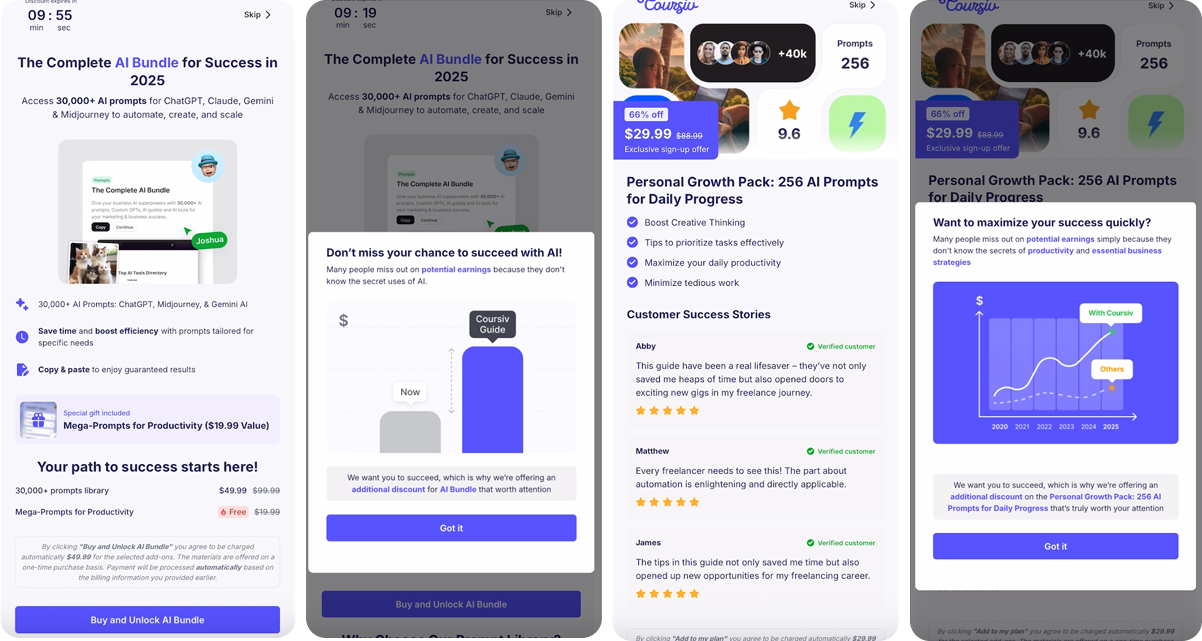
Coursiv is an AI productivity app that gives users access to thousands of AI prompts for ChatGPT, Claude, and Gemini. Right after checkout, Coursiv hits users with a “Personal Growth Pack” upsell: 256 exclusive prompts at 66% off ($29.99 instead of $88.99).
The offer feels special and urgent, thanks to a countdown timer, crossed-out original price, and plenty of social proof — over 40,000 users, high ratings, and real customer reviews.
2. Nibble
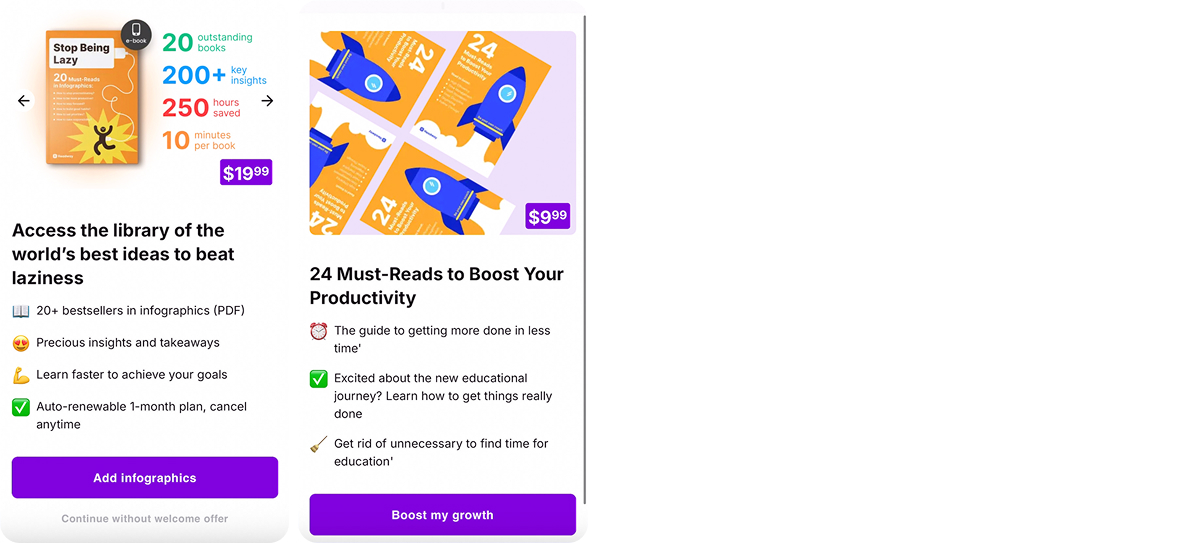
Nibble is a self-improvement app focused on learning with book summaries and infographics. As an upsell, it offers users add-ons like a pack of 20+ bestsellers in infographic format ($19.99) and a curated list of “24 Must-Reads to Boost Your Productivity” ($9.99).
This upsell example is minimalistic & easy to grab and highlights quick wins — faster learning, precious insights, and real results — right at the decision point.
3. Noom
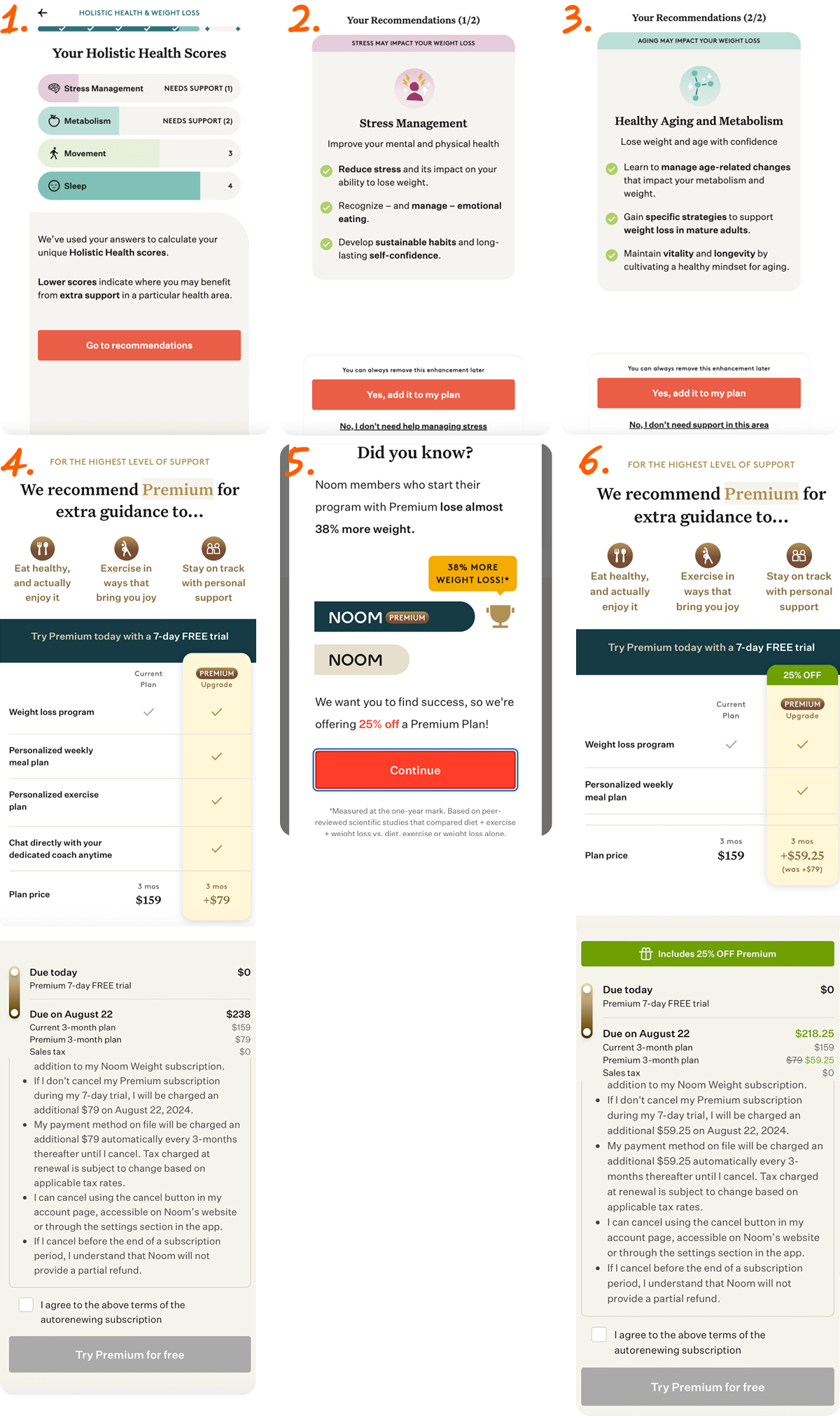
Noom is a popular weight loss and wellness app that uses upsells at two key moments: during onboarding and after checkout.
The app analyzes users’ answers on the onboarding questions and gives them a holistic health summary. Based on this, it recommends specific enhancements, like stress management or healthy aging plans, showing how each can help the user reach their goals faster. It’s an upsell, but it doesn’t just feel like a generic offer — instead, you feel seen and understood, with recommendations tailored to your unique needs and experience right from the start. That’s powerful.
After purchase, Noom doubles down with a 25% off Premium offer, using social proof (“38% more weight loss”) and a clear comparison of free vs. paid benefits.
4. Promova
Promova goes all-in on upsells for their English course. As soon as users start, they’re offered a personalized PDF course at a discount, followed by a series of targeted add-ons: a Phrasal Verbs Notebook, an Irregular Verbs Cheat Sheet, a “pay for one, get three” bundle, and even a personal lesson with a certified tutor.
Each upsell highlights a specific pain point or extra value, so that users can pick what matters most to them.
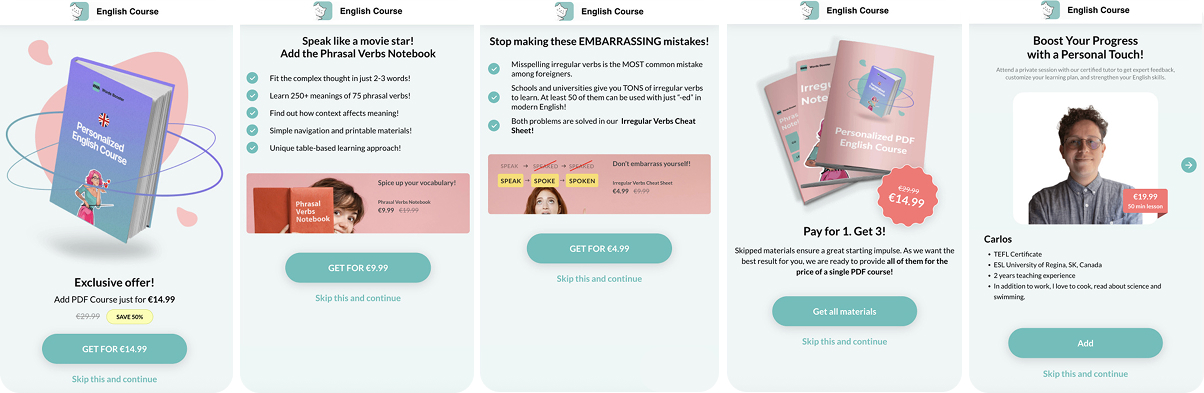
Note: match skip-button visibility to the accept button — a faint “Skip this and continue” under a solid CTA undercuts the “let them skip easily” principle above.
5. Vocal Image
Vocal Image is a voice training app that helps users improve their accent and speaking skills. For new subscribers, the app offers exclusive upsells like an e-book bundle (“Ultimate Voice & Mastering American Accent”) and an “Advanced Voice Guide”, each at a steep discount, clearly labeled as limited-time, first-time subscriber deals.
The focus is on instant value: practical guides and expert tips that support the user’s main goal, making it easy to add more with one tap.
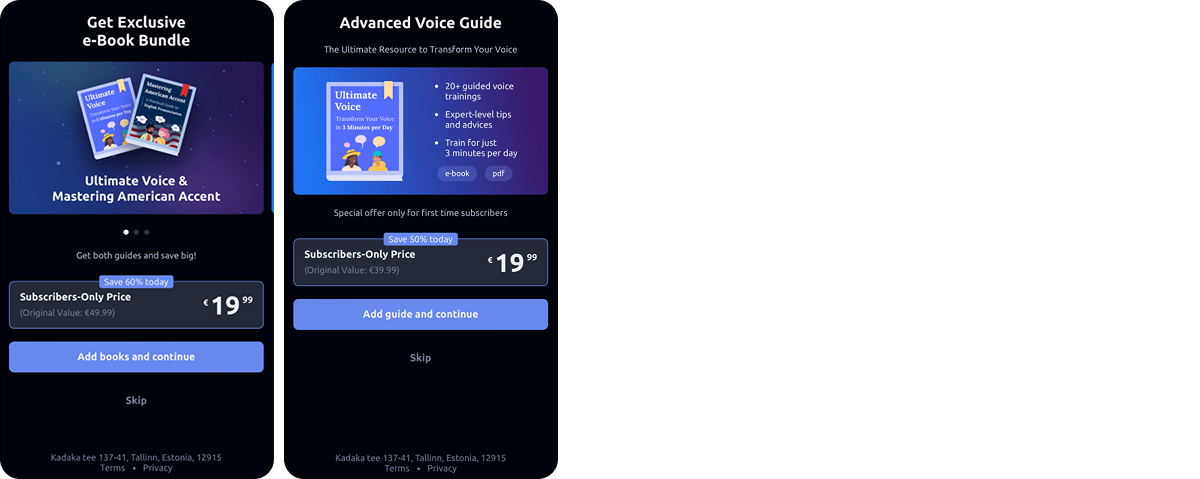
Note: same here — make sure “Skip” is as visible as the accept button, not a small grey link easy to miss.
6. Simple
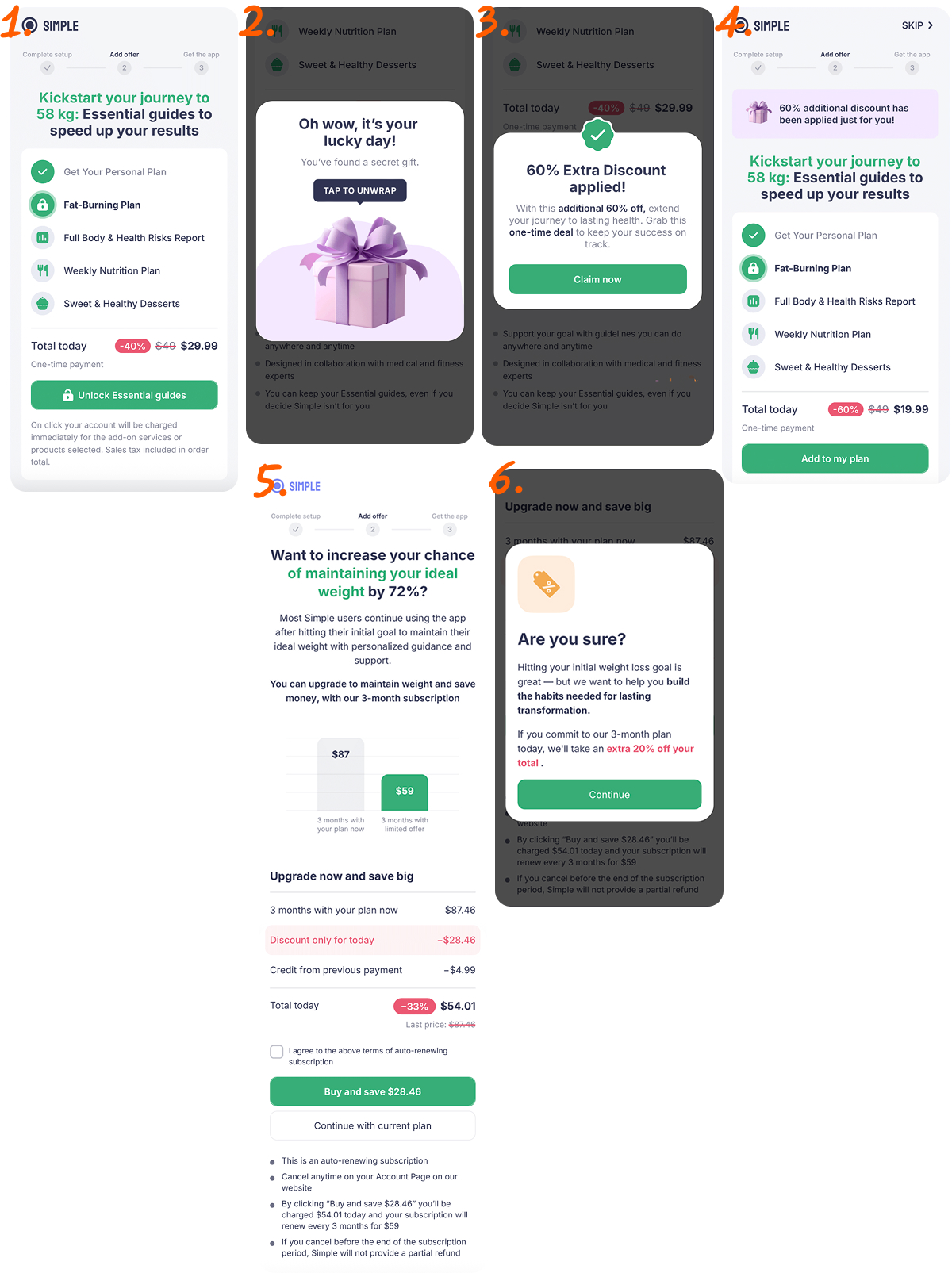
Simple is a weight loss and nutrition app. Right after onboarding, it offers an “Essential Guides” bundle with personalized plans and healthy dessert recipes at a steep discount, with extra “lucky day” savings and one-tap unlock. After users reach their goal, the app follows up with an upsell to maintain results: a discounted 3-month subscription, plus another incentive for long-term commitment. Simple keeps its upsells engaging, timely, and focused on supporting real user progress.
7. Liven
Liven, a mental wellness app, offers psychology workbooks for emotional health. Right after purchase, Liven presents an exclusive upsell: “The Reset Workbook,” a practical guide to breaking negative patterns, at a one-time discount. Users can also bundle multiple workbooks, each focused on topics like self-love or overcoming negative thinking.
The upsell feels relevant and expert-backed, helping users personalize their mental health journey and see more value right away.
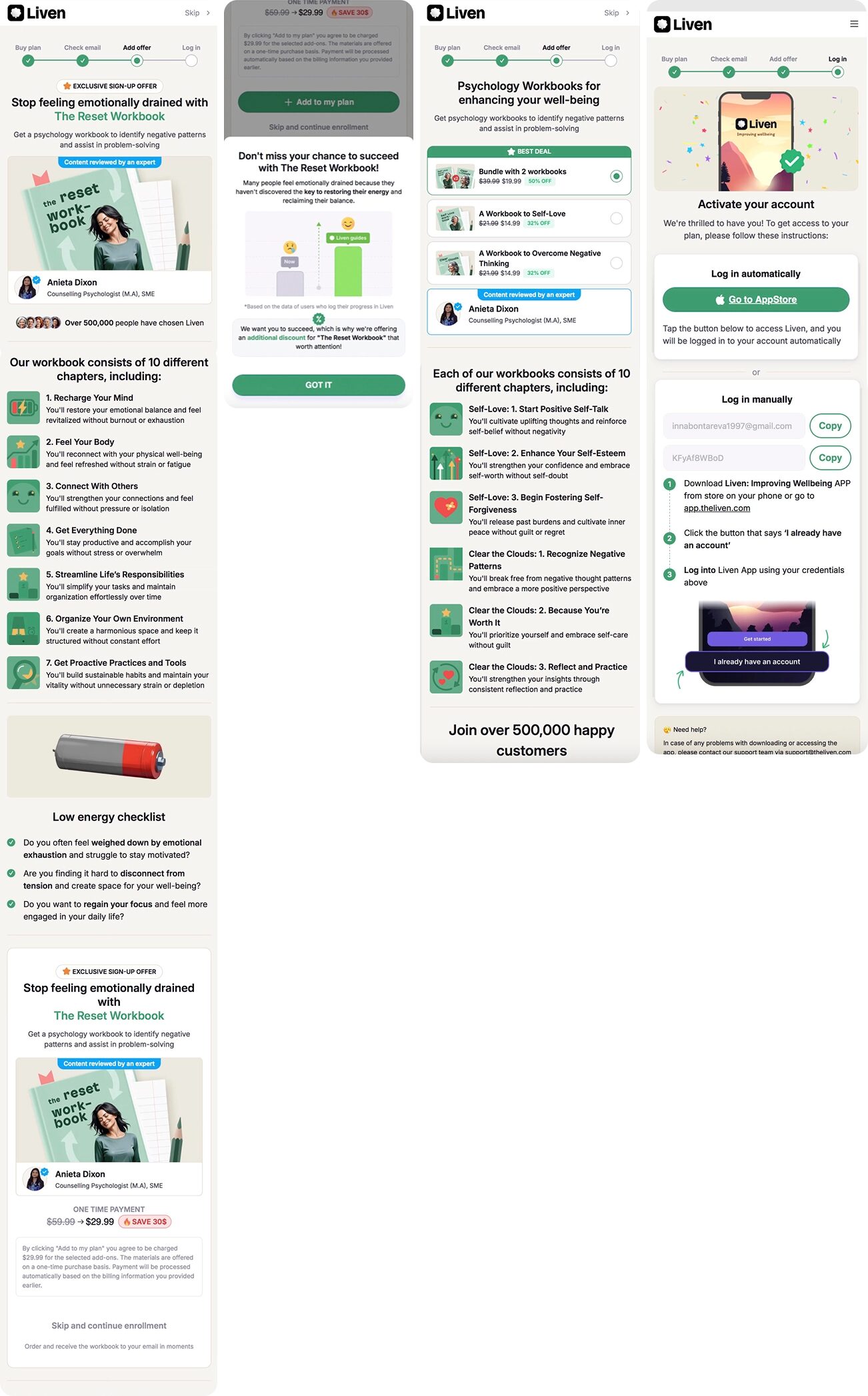
Note: “Skip and continue enrollment” reads like skipping delays getting the app, not like declining an add-on. Rephrase to something neutral, like a plain “Skip.”
As you can see, every app handles upsells a little differently — some pack in multiple offers wrapped in numerous screens, some focus on cleaner and simplerr versions. Most show upsells right after checkout, but sometimes weave them into onboarding. The right strategy depends on your app, vertical, and audience, but one thing’s clear: when upsells are timely and relevant, they work.
One-click upsells are easy with FunnelFox
One-click upsells aren’t just a nice-to-have — they’re one of the most efficient ways to increase revenue and LTV. By building upsells into your web2app funnel, you catch users at the perfect moment, making it easy for them to say yes to another purchase.
With FunnelFox, you can add upsell screens to your funnel without any dev work. Use a pre-built upsell block, prompt the AI to build a custom screen from scratch based on your app context, or share a screen you like and get something similar built for you. Configure an offer, set up an A/B test to see which pricing point or copy converts better, and watch your LTV grow.