




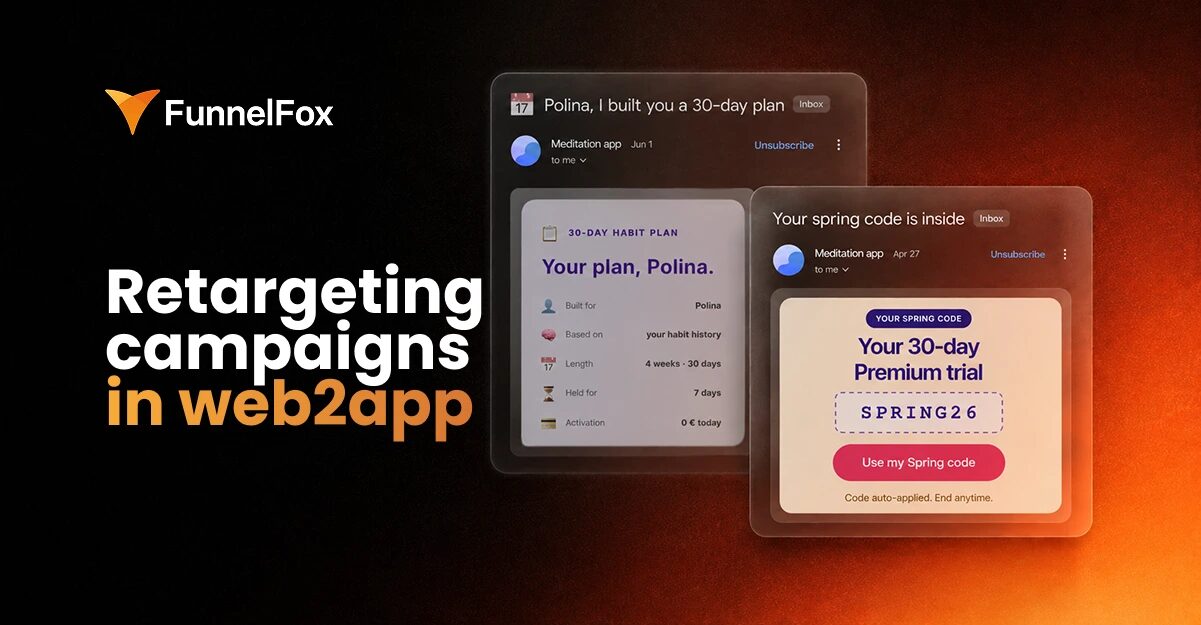
In web2app, every user who completes your quiz leaves an email address attached to a detailed record of what they want. That’s a retargeting asset no paid media pool can match—owned, precise, and available before the paywall even appears.
The question is whether you’re using that data precisely enough to convert the people who didn’t buy on the first pass.
How to segment from quiz data, which behavioral signals should trigger campaigns, and how FunnelFox connects funnel events to Braze so the right email fires automatically—that’s what this post covers.
For the emails to send at each lifecycle stage, see our guide to lifecycle email marketing for subscription apps.
Why web2app creates a better retargeting foundation than in-app
Web2app has a structural advantage over traditional in-app funnels at almost every step that matters for retargeting.
| In-app funnel | Web2app funnel | |
| When you get the email | Post-purchase, or never | Mid-session, before the paywall |
| Segmentation data at capture | Minimal | Full quiz answers—goal, context, urgency |
| Event visibility | Limited by ATT, SKAdNetwork | Clean server-side events, fully owned |
| Who you can retarget | Paying users only | Everyone who completed the quiz |
You have email before paywall
In a standard app funnel, email surfaces late—during account setup, in post-purchase confirmations, or sometimes never. By the time you have a contactable address, the user has already converted or permanently churned without leaving one.
In a web2app funnel, email is captured mid-session as part of the quiz flow, well before the paywall appears. According to FunnelFox’s web2app data, only 13% of users who start a quiz session reach the paywall, and just 3% complete a purchase. The overwhelming majority of users who leave their email address never become subscribers on that session—and most apps do very little with that list.
Quiz gives you segmentation data from the first touch
By the time a user submits their email, you typically know:
- Their primary goal and what result they came looking for
- Their specific pain point or context
- Their urgency or desired timeline
- Relevant demographic or lifestyle factors that shaped their answers
This is what the industry calls zero-party data—information a person intentionally shares with a brand. Stated intent, captured at the moment of highest engagement, with no tracking or inference required.
In practice, your retargeting emails can reference what the person said they wanted—their goal, their situation, the result they came looking for—rather than sending a generic “you left without buying” to a segment defined only by the absence of a purchase. That specificity is what moves open rates and click rates.
Subscription events are fully visible on the server side
In-app purchase events are subject to ATT restrictions, SKAdNetwork attribution limits, and the broader opacity of the app store layer. On the web, none of those constraints apply. Every subscription lifecycle event—trial started, trial converted, subscription renewed, payment failed, plan changed—is a clean server-side event you own and can route to any downstream system.
For retargeting email, triggers are precise. A campaign doesn’t fire because a user “seems inactive”—it fires because a specific, known event occurred at a specific timestamp for a specific user whose profile you already have.
How to segment your drop-off list using quiz data
Treating everyone who didn’t purchase as a single group produces weak results. The people in that pool have different relationships with your product, different reasons for not buying, and different messages that will actually move them.
Here’s how to think about the segmentation layers.
Segment by stated goal
The primary goal a user named in the quiz is the most important segmentation dimension for retargeting. A user who said they want to improve their sleep and a user who said they want to build a morning routine are both in the “didn’t purchase” pool—but they need completely different subject lines, different body copy, and probably different offers.
Build one email track per primary goal. Every email in that track should open by referencing what the person said they wanted—not a generic benefit of your app. The lift from goal-personalized subject lines versus generic ones is consistent and significant, and it’s the lowest-effort personalization available since the data is already attached to the contact.
Segment by drop-off point in the funnel
Not all non-purchasers dropped off at the same place. A user who stopped mid-quiz has a different level of investment than one who completed it, saw the paywall, and then left. The second group is warmer—they went further, saw the offer, and made a deliberate decision not to buy in that moment.
| Drop-off point | Warmth | Right campaign angle |
| Mid-quiz | Low | Re-engage with the outcome they were heading toward |
| Post-quiz, pre-paywall | Medium | Remind them what the plan covers; single CTA |
| Saw paywall, didn’t buy | High | Address the specific friction—price, commitment, doubt |
For the paywall drop-off group, email follow-ups can recover 5–20% of revenue depending on the vertical and sequence quality (Kirill Makarov, based on his analysis of 311 web funnels).
Segment by acquisition source
Different traffic sources bring users with different intent levels and contexts. A user who came from a Meta feed ad after seeing a problem-focused creative is in a different headspace than one who came from a Google search for your app category. Knowing the acquisition source—passed via UTM parameters through the funnel—lets you match the retargeting message to what originally brought the user in.
This is especially useful when running multiple funnels for different creative angles. The retargeting email for a user who came through a stress-reduction angle should speak to that angle, not pivot to a generic product message.
Layer in behavioral signals after capture
Quiz answers are the baseline. Once you have a contact in your ESP, behavioral signals add another dimension:
- Opened welcome email, didn’t click → engaged but unconvinced; needs social proof or a stronger value statement
- Clicked to paywall, didn’t buy → high intent; address the specific objection
- Didn’t open at all → test a different subject line before escalating
The real precision comes from combining both layers: what the user told you in the quiz, plus what they’ve actually done since. “Stated goal is better sleep + completed quiz + saw paywall + no purchase in 48 hours + opened welcome email” is a segment with a specific, writable email.
Which event triggers should power your retargeting campaigns
Retargeting emails fail most often not because of weak copy, but because of imprecise triggers. An email that fires at the wrong moment lands as noise—regardless of how well it’s written.
| Trigger | Timing | What it signals |
| Email captured + no purchase | 1–2 hours | Dropped off before or at paywall |
| Email opened + paywall not clicked | 24 hours | Engaged but not convinced |
| Paywall revisited + no purchase | Immediate | Strong intent, specific friction |
| No conversion after 3 emails | Day 5–7 | Genuinely hesitant; ready for an offer |
| Still no conversion | Day 10 | Final window—suppress after this |
Email captured + no purchase within 1–2 hours
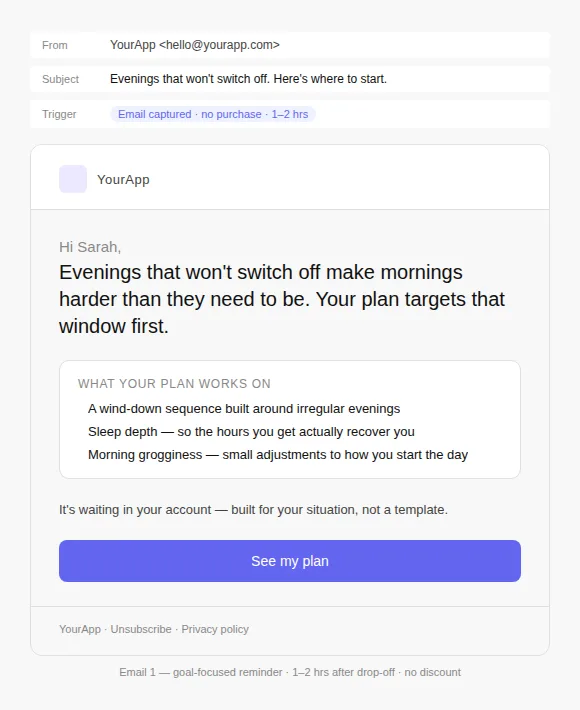
This is the core retargeting trigger and the highest-intent window in the sequence. The first email should fire within one to two hours, while the quiz experience is still fresh. Reference the user’s goal and walk them back to the paywall with a single CTA.
Don’t lead with a discount at this stage. The user may have left because they were distracted, unsure, or simply not ready—not because of price. Introduce the offer only if the first email doesn’t convert.
Example: Email 1 (goal-focused reminder, sent 1–2 hrs after drop-off):
Email opened, paywall link not clicked after 24 hours
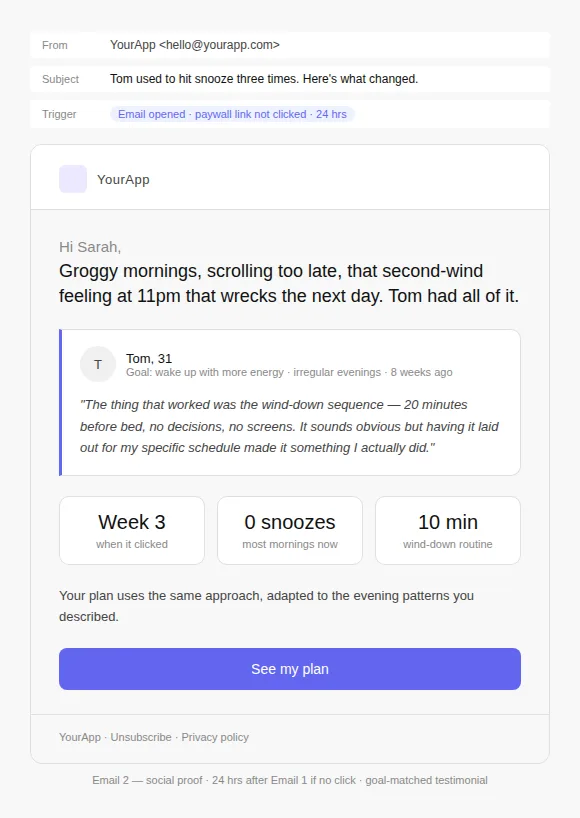
A user who opened the welcome email is reachable. If they haven’t clicked back to the paywall within 24 hours, this email should add something new—social proof the paywall didn’t include, a user story, or a sharper articulation of the result they came looking for.
Example: Email 2 (social proof, sent 24 hrs after Email 1 if no click):
Paywall visited again + no purchase
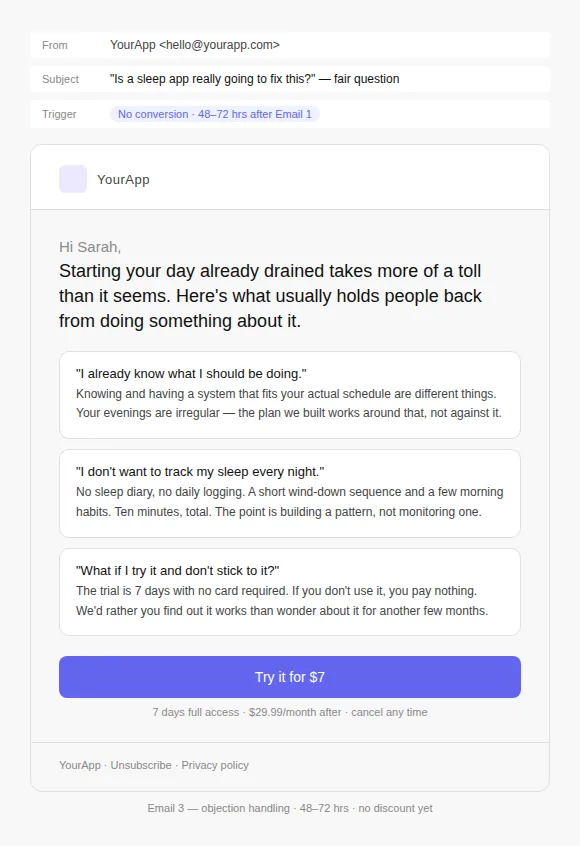
A user returning to the paywall without buying is a strong intent signal—they came back on their own. FunnelFox captures paywall revisits at the screen level, making this trigger available without custom tracking. This is the right moment for a direct message: a time-limited offer, a plan comparison, or a FAQ addressing common objections.
Example: Email 3 (objection handling, sent 48–72 hrs after Email 1):
Three to five days post-capture with no conversion
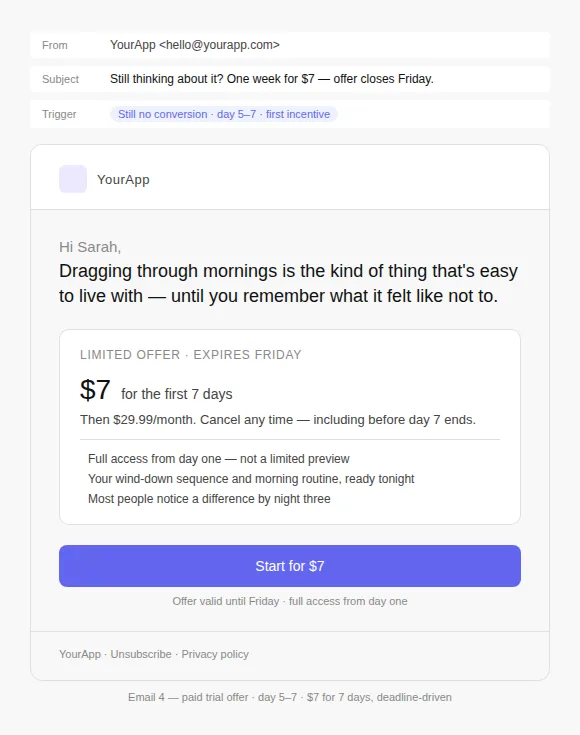
By day five, most users who were going to convert on email have converted. What remains are the genuinely hesitant—and this is the right point to introduce a paid trial offer. Reduced entry price, full access, real deadline. Frame it around the goal, not the discount.
Example: Email 4 (paid trial offer, sent day 5–7):
Day 10: final send
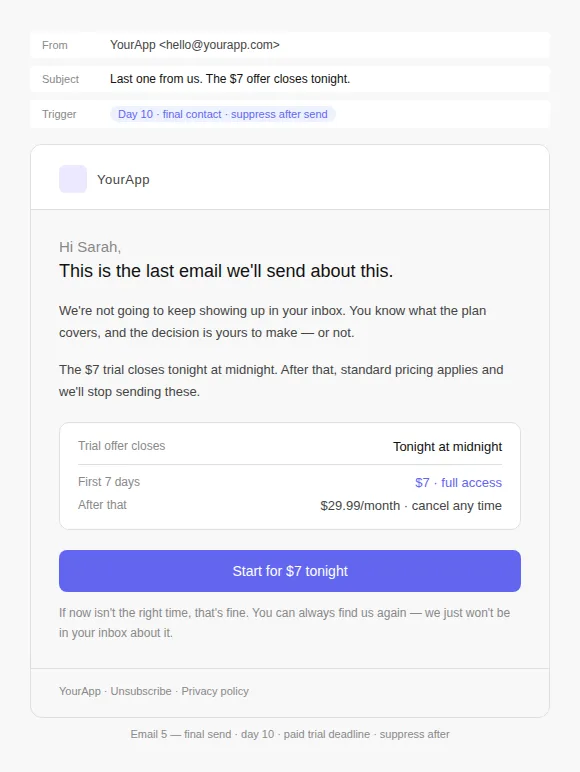
The final email should mean it. Genuine finality, not fake urgency. State the offer clearly and simply, then let it go. After this, suppress the contact to protect list health and deliverability.
Example: Email 5 (final send, day 10):
How FunnelFox connects funnel events to Braze
Connecting funnel events to your email platform usually means custom engineering work—every time you want to trigger a new campaign. FunnelFox solves this through its native Braze integration.
What flows to Braze automatically
Once the integration is active, FunnelFox forwards subscription lifecycle events from your funnels to Braze server-side, in real time:
- Profile update — subscriber enters or changes their email or phone in the funnel
- Trial started — subscriber begins a trial
- Trial converted — trial converts to a paid subscription
- Subscription started — new paid subscription begins
- Subscription renewed — recurring charge confirmed by the payment provider
- Subscription updated — subscriber changes their plan (upgrade or downgrade)
- One-off purchase — one-time, non-subscription purchase
- Upsell — subscriber completes an upsell purchase
Each event is timestamped and tied to a unified subscriber profile. FunnelFox identifies each user in Braze using a consistent profile ID, so quiz answers, purchase history, and behavioral data all live under one record—regardless of how many funnels that user has touched.
For retargeting email, the most critical events are Profile update (email captured, retargeting window opens) and the absence of Subscription started within a defined period after that. That gap is your trigger condition.
Quiz data as contact properties
Quiz answers flow to Braze as contact properties—filterable dimensions you can use to build segments, trigger flows, and personalize messaging across the full sequence. When building a campaign in Braze, you can filter by:
- Primary goal or quiz persona
- Acquisition source and UTM parameters
- The specific paywall variant the user saw
- Any other data point captured during the quiz flow
The segmentation logic lives in Braze. The data pipeline runs automatically from FunnelFox.
Setup
Connecting FunnelFox to Braze requires only an active Braze account. The integration works via API—setup takes a few minutes and no engineering work is needed on your end.
See the full setup guide in the docs
The retargeting sequence that works
A single email rarely converts a non-buyer. Each email in the sequence should add something new rather than repeating the same message at louder volume—a different angle, new evidence, a concrete reason to act now.
| Timing | Job | |
| 1 | 1–2 hrs after drop-off | Goal-focused reminder. Single CTA. No discount. |
| 2 | 24 hrs, if no click | Social proof matched to the stated goal. |
| 3 | 48–72 hrs, if no conversion | Address the most likely objection for this persona. |
| 4 | Day 5–7, if still no conversion | Paid trial offer with a real expiry date. |
| 5 | Day 10 | Final send. Genuine close. Suppress after. |
The sequence gets shorter as intent signals increase. A user who revisited the paywall before Email 3 is showing strong intent—the objection-handling email and the offer can be condensed and sent sooner. FunnelFox’s screen-level tracking makes that signal visible; Braze can act on it.
Retargeting as a revenue recovery system
The teams that recover meaningful revenue from pre-purchase drop-offs treat retargeting as a system—segmented by what users said, triggered by what users did, sequenced to add something new at each step. In FunnelFox, the infrastructure for that system is built into the platform: quiz data flows to Braze as contact properties from the moment of email capture, subscription lifecycle events flow as ready-to-use triggers, and the whole thing runs without custom engineering.
What’s left is the campaign logic—and that’s where growth managers can actually move the needle.
If you’re already running web2app funnels in FunnelFox, the Braze integration is available under Integrations in your account.
If you’re evaluating FunnelFox for your web2app stack, book a demo to see how funnel data, payment events, and lifecycle triggers work together in one platform.