






This round of FunnelFox updates spans billing, ad tracking, and funnel personalization. Details on each below.
Handle sales tax at checkout with FunnelFox Billing
FunnelFox Billing now supports adding sales tax on top of your checkout prices. Choose between two ways to calculate:
- Stripe Tax—automatic tax rates determined by the buyer’s location, updated in real time.
- Static—rates you configure yourself in the Tax Rates page, applied based on country or jurisdiction.
Tax is estimated in real time as the buyer enters their billing address, then charged with the payment. Your listed prices stay net—tax is always added on top, never included in the base price.
What it means for you: built-in tax compliance for your checkout, without adding a separate tax handling system. Especially useful if you sell across multiple regions and want the tax layer to sit inside the same billing system as your subscriptions.
Learn more about FunnelFox Billing Taxes
Unlock a new revenue stream with consumables
FunnelFox Billing now supports consumables—repeatable one-time purchases that get consumed as users spend them. Think session credits (for coaching, tutoring, or consultations), AI generation credits, or any product a user buys, uses up, and can buy again.
Consumables are different from one-off purchases (which already existed in FunnelFox Billing): one-offs give permanent access to something specific, while consumables are meant to be spent and refilled. Set up a consumable as a Feature with the consumable type, attach it to a Price Point, and it’s ready to sell.
What it means for you: monetize beyond subscription revenue with products your users can repeatedly buy. If your app has session-based services, credit-based features, or any consumable resource, you can now sell those directly through the same FunnelFox Billing setup.
Branch your funnel by traffic type
Dynamic navigation and conditional visibility now support a Traffic type condition. You can now route users through different paths—or show and hide elements—based on whether they arrived from paid ads or organic traffic.
Paid means the entry URL carries a known ad-network click ID (like ‘gclid’ from Google, ‘fbclid’ from Meta, or ‘ttclid’ from TikTok). Organic is everyone else.
What it means for you: tailor your funnel to the acquisition source. Show a paid-user-specific paywall message. Hide a free-trial CTA for organic users who arrived through search. Match your funnel flow to how you paid to acquire the visitor.
Learn more about dynamic actions
Send TikTok a stronger signal
FunnelFox now sends TikTok’s ViewContent event server-to-server through TikTok’s Events API. It fires when a paywall or checkout screen appears in your funnel—a mid-funnel signal for TikTok’s algorithm to identify users likely to convert.
Server-side event sending improves signal reliability compared to browser-side pixel tracking, which can be blocked or throttled by iOS, browsers, or ad blockers.
What it means for you: cleaner attribution data for your TikTok campaigns, especially in mobile environments where browser tracking is unreliable. Better signal means better optimization by TikTok’s algorithm—and typically better ROAS over time.
Learn more about TikTok tracked events
Preview your funnel as Instagram users see it
The Editor now has an appearance switcher that lets you preview your funnel inside a simulated Instagram in-app browser—where Instagram’s UI takes up space at the top of the screen. This shows exactly how users arriving from Instagram ads will see your funnel.
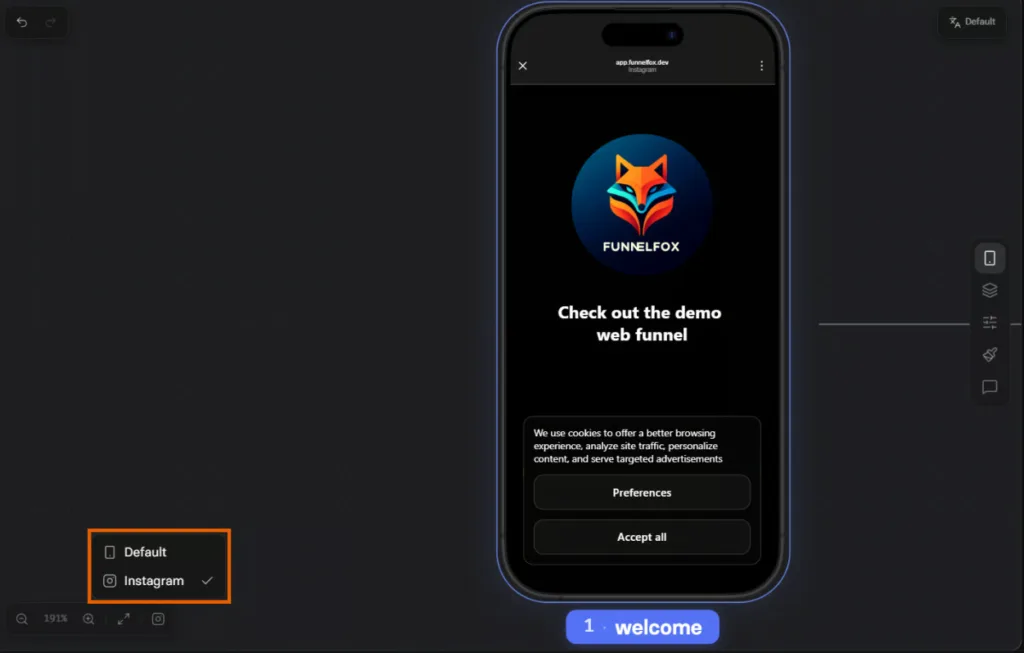
Switch between Default (plain phone frame) and Instagram in the bottom left of the Editor to compare views before publishing.
What it means for you: catch layout issues before they reach paid traffic. If your first paywall CTA or headline sits at the top of the screen and gets cropped by Instagram’s UI on real user devices, you’ll see that in preview instead of learning about it from ad campaign underperformance.
Learn more about preview modes
That’s the batch. For the complete list of what’s shipped recently, check the FunnelFox release notes.